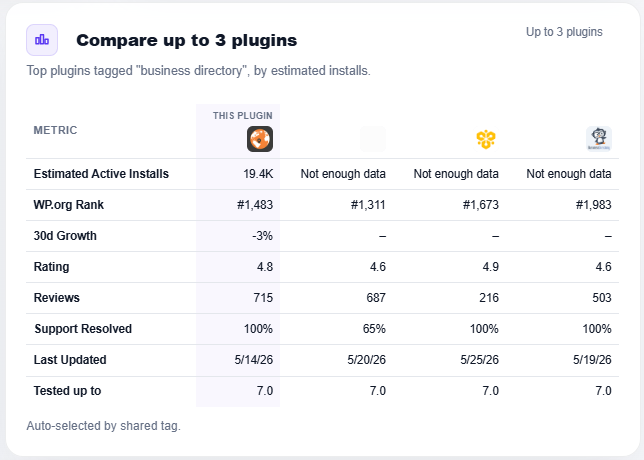
Every plugin on WordPress.org can be measured against its competitors, and on wp-rankings.com, you can see exactly how they stack up, side by side.
It’s free, no login required
You can view the stats of every plugin in the WordPress.org directory without registering or paying anything. Open any plugin page, and you’ll find its comparison table already built.
How the comparison works
On each plugin page, the comparison table is generated automatically. We take the plugin’s tags, find the top plugins that share those tags, ranked by active installs, and show them next to the plugin you’re viewing. So out of the box, every plugin is compared against the biggest players in its category, the competitors most worth watching.
The table lines up the metrics that matter: official and estimated active installs, WordPress.org rank, 30- and 90-day growth, rating, reviews, support resolved, last updated, and more, so you can see at a glance where a plugin leads and where it trails.
Make it yours: claim your plugin
The automatic comparison is a starting point. If you want to choose exactly which competitors to track, register, log in, and claim up to 3 of your plugins (one free account, three plugins).
Once a plugin is claimed, you can edit its comparison table and pick your own competitors. When editing your plugin’s information, just enter the slugs of the plugins you want to compare against, comma-separated, and they’ll replace the automatic picks.
Tip: a plugin’s slug is the last part of its WordPress.org URL. For wordpress.org/plugins/woocommerce/, the slug is woocommerce.
Need more?
Free accounts can claim 3 plugins and compare against 3 competitors. If you want to claim more plugins and track more competitors, vote here to tell us premium features are worth building. The more votes we get, the sooner we build them.