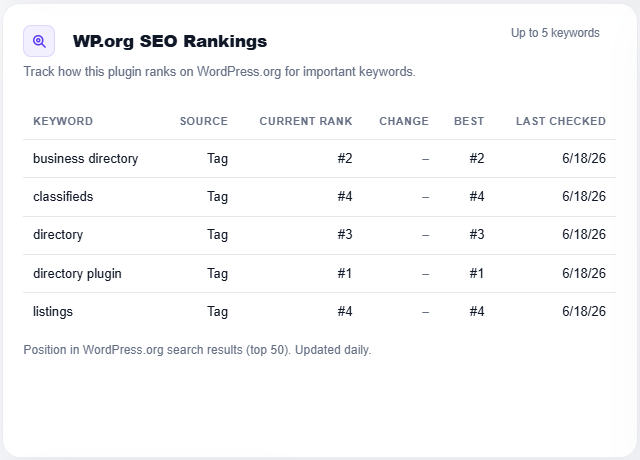
Where does a plugin rank in WordPress.org search? On wp-rankings.com you can see how every plugin places for the keywords that matter in its niche, and track how those positions move over time.
It’s free, no login required
You can view the WordPress.org search rankings of every plugin in the directory without registering or paying anything. Open any plugin page and its keyword rankings are already there.
How the rankings work
On each plugin page, we show where that plugin ranks in WordPress.org search for a set of keywords. By default, those keywords come from the plugin’s own tags, the terms it has already chosen to describe itself, so out of the box every plugin is tracked against the searches it’s most likely competing for.
For each keyword you’ll see the current rank, how it has moved, the best rank reached, and when it was last checked. Rankings are collected by scheduled background checks, not on page load, so the page stays fast and the data is always recent.
Make it yours: claim your plugin
Your tags are a starting point, but they may not be the keywords you actually care about ranking for. If you want to choose your own, register, log in, and claim up to 3 of your plugins (one free account, three plugins).
Once a plugin is claimed, you can edit its tracked keywords and replace the defaults with up to 5 keywords of your choice. When editing your plugin’s information, just enter the keywords you want to track, comma-separated, and we’ll start following your rank for those terms. Prefer the originals? Reset to your plugin tags anytime.
Need more?
Free accounts can claim 3 plugins and track 5 keywords each. If you want to claim more plugins and follow more keywords, vote here to tell us premium features are worth building. The more votes we get, the sooner we build them.